Printables
Download Your Free 4x6 Planner Templates & Photo Calendars
Welcome to the Get-Noted! free design gallery. We believe crafting should be stress-free and affordable, which is why we've created a library of beautiful, ready-to-print layouts tailored perfectly for our 4" x 6" printable notepad sheets.
No scaling, no test printing, and no tedious paper cutting required. Simply download your favorite design files to your phone or desktop gallery, load your printer's photo tray with our pre-cut cardstock paper, and print!
Our Free Crafting Library Includes:
- Blank Calendar Grids: Monthly layouts perfect for creating personalized desktop photo calendars using our chipboard easel stands.
- Daily Productivity Trackers: Clean, functional to-do lists designed to slide right into your clear adhesive planner pockets.
- Creative Border Templates: Fun frames, seasonal accents, and inspiring quote backgrounds to make personalized gifts for friends, teachers, and family.
Click on the image to start your PDF download.


Bullet Journal dotted & graph papers


2026 Positive Quotes Calendar (12 months)
2027 Positive Quotes Calendar (12months)

Free 2026/2027 Monthly Calendars - Just Add Your Own Photos

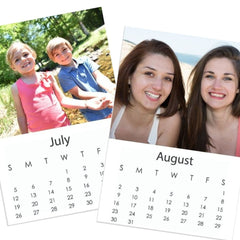
To print on DIY notepads 4" x 6" paper, the following changes need to be made after you have downloaded the PDF and selected the printer icon (usually in upper right corner of PDF download).
Every printer, graphics program and computer system have different dialog boxes. In order to make all these changes, you may need to click on "Print using system dialog... " and the "Advanced" option. The changes are:
- Page Layout Size - Set to 4" x 6"
- Paper Size - Set to 4" x 6"
- Media Type or Paper Type - Set to Plain Paper or Standard Copy Paper